

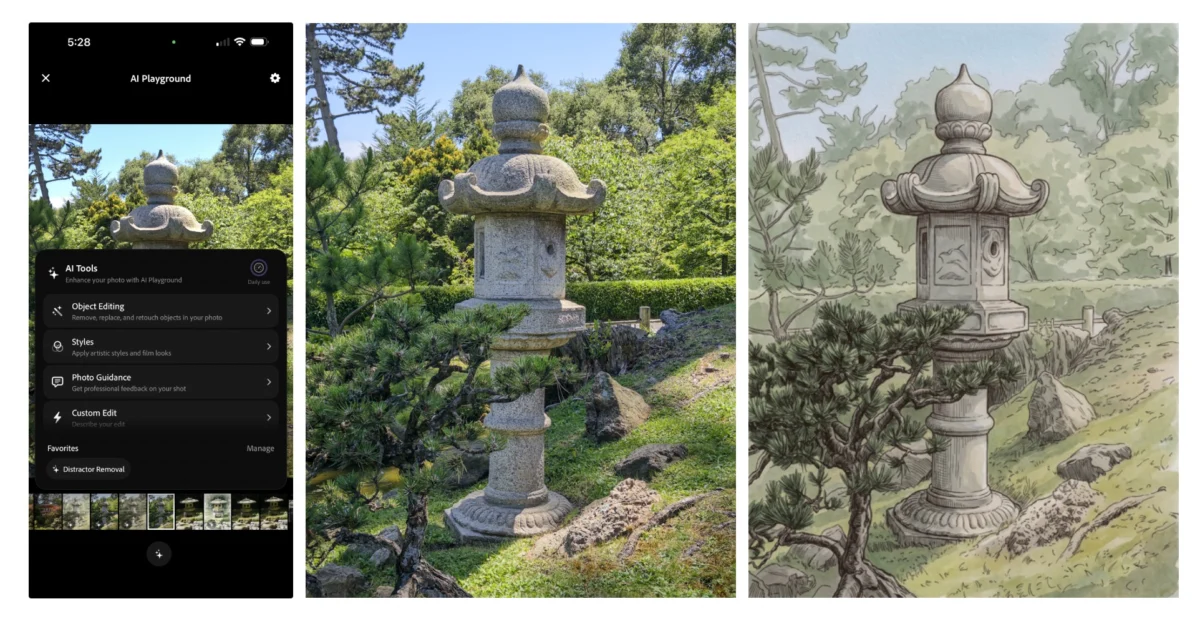
Adobe is significantly enhancing its experimental iOS camera application, Project Indigo, with a suite of new artificial intelligence features designed to transform how users capture and refine photographs. Launched last year, Project Indigo initially offered advanced manual controls, multi-frame super-resolution, and diverse capture modes, establishing itself as a platform for cutting-edge mobile computational photography. The latest update, however, marks a substantial leap forward, integrating large language models (LLMs) to provide sophisticated photo critiques and actionable editing suggestions, alongside other generative AI capabilities like advanced object removal, depth of field generation, and creative style transfers. This move underscores Adobe’s commitment to pushing the boundaries of AI in creative workflows, bringing professional-grade tools and insights directly into the hands of iPhone users.
A New Era of Intelligent Photo Critique and Guided Editing
At the core of Project Indigo’s latest update are two groundbreaking features powered by LLMs: comprehensive photo critiques and dynamic capture and edit suggestions. Unlike previous rudimentary "camera coach" features seen in some smartphone cameras, such as Google’s Pixel phones, Project Indigo’s AI offers highly descriptive and nuanced feedback. Marc Levoy, the visionary leader behind Adobe’s Project Indigo, who previously spearheaded the acclaimed camera development for Google Pixel, highlights the distinction. Levoy notes that while many generative AI tools rely on intricate prompt-based editing, which can be challenging for users to master, Project Indigo prioritizes more deterministic outputs through intuitive button-based interfaces. This design philosophy aims to democratize advanced photography knowledge and editing capabilities, making them accessible without requiring extensive technical expertise.
The photo critique function delivers a "professional" assessment of an image, dissecting elements such as framing, lighting, color balance, and even emotional impact. This goes beyond simple technical analysis, delving into the artistic qualities that define a compelling photograph. For instance, the AI might commend a shot for its leading lines and golden hour lighting while simultaneously suggesting a tighter crop to enhance subject focus and eliminate distractions. This level of detail provides invaluable learning opportunities for budding photographers, helping them understand the principles of good composition and exposure, even if they choose not to fully adopt the AI’s assessment.

Complementing the critique, the capture and edit suggestions offer practical, real-time advice. Users might receive tips on how to reshoot a scene, with specific recommendations for altering framing, adjusting exposure settings, or even repositioning objects within the viewfinder. A notable example cited by early testers includes the app’s ability to identify and suggest the removal of an unwanted hexagonal white object from a test photo, demonstrating its granular understanding of compositional nuisances. Furthermore, Project Indigo extends its guidance to post-processing, offering tailored recommendations on how to enhance existing photos using familiar Adobe Lightroom controls, bridging the gap between capture and professional-grade editing.
Advanced AI Editing: Beyond Basic Retouching
Beyond analytical critiques, Project Indigo introduces several powerful AI-driven editing tools that push the envelope of mobile photo manipulation. Object removal, a feature present in various forms across apps like Apple Photos, Google Photos, and even Adobe Photoshop for years, receives a significant upgrade. Historically, these tools often required users to manually circle or draw around an unwanted object, a process that could be imprecise and frequently resulted in noticeable artifacts. Project Indigo revolutionizes this by offering intelligent, toggle-based removal options for common distractions. Users can simply select categories like "people in the background," "trash and trash cans," "wires and poles," "fences," or "vehicles," and the AI intelligently identifies and seamlessly removes these elements. The ability to describe and remove custom objects further enhances its versatility. Initial tests indicate impressive results, with the app effortlessly erasing complex elements, such as a person and an object they were holding, from the background without leaving behind strange blurs or distortions, a testament to its sophisticated generative infilling capabilities.
Another notable addition is the AI’s ability to generate depth of field. This feature allows users to simulate a blurred background, commonly known as bokeh, in photos that may have originally lacked this aesthetic. Traditionally, achieving a pleasing depth of field required specific camera lenses with wide apertures or advanced computational photography techniques built into high-end smartphone cameras. Project Indigo’s AI can now intelligently analyze an image, identify subjects and backgrounds, and apply a natural-looking background blur, effectively transforming a flat image into one with greater artistic separation and visual impact. This capability democratizes a previously exclusive photographic effect, enabling more creative expression for mobile photographers.
The update also reintroduces and refines the concept of style transfer. While not entirely new—apps like Prisma popularized similar features years ago—Project Indigo’s implementation benefits from more advanced models, leading to refined and artistically compelling outputs. Users can transform their photos into various artistic renditions, including watercolor paintings, pen and ink sketches, ink lines with color washes, monochromatic interpretations, and backlit subjects. While Marc Levoy’s philosophy emphasizes deterministic outputs over free-form prompting, Project Indigo does include a feature allowing users to describe custom edits, acknowledging the desire for more personalized creative control, even if it introduces the "road to slopland" that Levoy cautions against.

Adobe’s Strategic Vision: Integrating AI into the Creative Ecosystem
Project Indigo’s advancements are not isolated but rather a critical component of Adobe’s broader strategy to embed artificial intelligence across its entire creative suite. The company has been at the forefront of AI innovation in creative fields, with its Adobe Sensei framework powering intelligent features for years, and more recently, the highly publicized Adobe Firefly generative AI models. The current features in Project Indigo are leveraging Google’s Gemini-based Nano Banana, but Adobe has expressed openness to integrating other powerful models, including its own Firefly suite, which is already making significant inroads in applications like Photoshop and Illustrator. This flexibility ensures that Project Indigo can continually evolve and benefit from the most advanced AI research available.
The experimental nature of Project Indigo is a key aspect of its development. Bundled under an "AI playground" tab, these new features are currently accessible only to select users in a testing phase. This approach allows Adobe to gather crucial feedback, refine algorithms, and assess user interaction before potentially rolling out features to a wider audience. It also signifies Adobe’s commitment to innovation and exploration, using Project Indigo as a sandbox for groundbreaking AI applications in mobile photography. While there’s no guarantee that every experimental feature will make it to a general release, the initiative itself highlights Adobe’s dedication to pushing the boundaries of what’s possible in mobile imaging.
The Evolving Landscape of Mobile Photography and AI’s Impact
The introduction of these advanced AI features in Project Indigo reflects a significant trend in the mobile photography landscape. The market for photo editing apps continues to grow robustly, with global revenue for mobile photo and video editing applications projected to reach several billion dollars annually. Users are increasingly seeking sophisticated yet intuitive tools to enhance their smartphone photos, which have become the primary means of visual capture for billions worldwide.

The evolution of computational photography, pioneered by devices like the Google Pixel series (under Marc Levoy’s earlier guidance), has fundamentally reshaped what’s achievable with a smartphone camera. Features like HDR+, Portrait Mode, and Night Sight rely heavily on complex algorithms and AI to produce images that rival traditional cameras. Project Indigo extends this paradigm by not just enhancing capture but intelligently guiding users through the creative and editing process.
For amateur photographers, these tools represent an unprecedented opportunity for learning and skill development. The AI’s critiques can act as a virtual mentor, offering insights into photographic principles that would otherwise require formal training or years of practice. For casual users, the simplified, button-based editing allows for professional-looking results without the steep learning curve associated with traditional photo editing software.
However, the proliferation of AI-powered editing also raises broader implications. The ease with which objects can be removed or scenes altered could further blur the lines between reality and manipulated imagery. While Project Indigo’s current features are primarily focused on aesthetic improvement, the underlying technology has the potential for more significant alterations. Adobe, as a leader in creative software, has a responsibility to consider these ethical dimensions, a responsibility it has acknowledged with initiatives like the Content Authenticity Initiative, aimed at combating misinformation through content provenance.
Looking Ahead: The Future of Creative AI in Mobile
Project Indigo’s latest update is more than just a collection of new features; it represents a vision for the future of mobile photography where AI acts as an intelligent co-creator and guide. By making sophisticated critique and powerful editing tools accessible and intuitive, Adobe is empowering a new generation of mobile photographers to elevate their craft. The emphasis on deterministic outputs, while still offering avenues for custom generative editing, strikes a balance between accessibility and creative freedom.

As Adobe continues to iterate on Project Indigo and integrate its learning into its wider product ecosystem, we can anticipate a future where AI-driven assistance becomes a standard, rather than an experimental, component of mobile creative applications. The journey from rudimentary filters to intelligent photo coaches and seamless object removal demonstrates the rapid pace of innovation. Project Indigo, in its current experimental phase, is a compelling preview of this intelligent future, promising to make people more aware of the nuances in photography, fostering genuine skill development rather than merely generating "more slop." The insights gleaned from this project will undoubtedly influence the next generation of creative tools, solidifying Adobe’s position at the forefront of digital creativity.
