

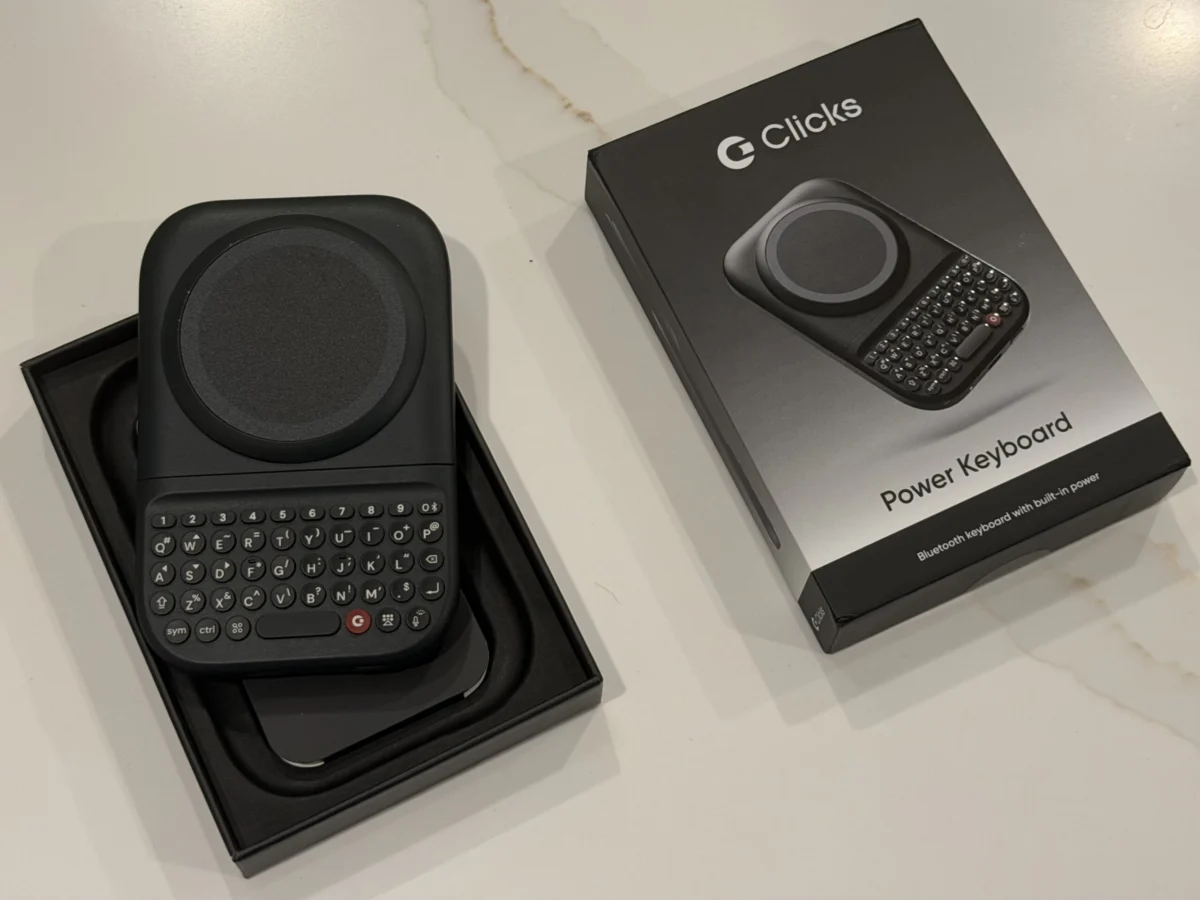
Clicks Technology, a burgeoning startup committed to reintroducing tactile keyboards to the smartphone experience, has commenced shipping its innovative Power Keyboard this summer. Priced at $99 and featuring MagSafe compatibility, the launch follows a brief period of delays, with the company confirming that approximately 75% of initial batch pre-orders have already reached customers. This accessory marks a significant step in Clicks’ mission to cater to users who lament the departure of physical keys from modern mobile devices, setting the stage for their eagerly anticipated BlackBerry-inspired smartphone later this year.
The Enduring Appeal of Physical Keyboards
The journey of mobile phone input has largely been a story of evolution from mechanical buttons to virtual touchscreens. For decades, physical keyboards were synonymous with mobile productivity, most notably championed by Research In Motion (RIM) with its iconic BlackBerry devices. From the early 2000s through to the early 2010s, BlackBerry’s full QWERTY keyboards offered unparalleled typing speed, accuracy, and tactile feedback, making them indispensable tools for business professionals and text-savvy consumers alike. Users developed muscle memory for these keyboards, allowing for rapid, error-free communication without needing to visually confirm each key press. The distinct "click" and physical separation of keys provided a sensory experience that virtual keyboards, despite advancements in haptic feedback, have struggled to replicate.
The advent of the iPhone in 2007, and the subsequent proliferation of Android devices, ushered in the era of the all-screen smartphone. This paradigm shift prioritized larger displays for multimedia consumption, web browsing, and app interaction, pushing physical keyboards to the periphery. While on-screen keyboards offered flexibility, customizable layouts, and eliminated hardware bulk, they introduced new challenges: reduced screen real estate during typing, a higher propensity for typos due to lack of tactile guidance, and a less satisfying input experience for many power users. Despite the overwhelming market preference for touchscreens, a dedicated segment of users has consistently expressed a desire for the return of physical keys, yearning for the efficiency and familiarity of their past typing experiences. Clicks Technology has strategically positioned itself to address this very niche, aiming to bridge the gap between contemporary smartphone technology and the beloved tactile input of yesteryear.

Introducing the Clicks Power Keyboard: Design and Functionality
The Clicks Power Keyboard is not merely a nostalgic nod; it’s a meticulously designed accessory engineered to integrate seamlessly with a wide array of modern smartphones. Its slide-out mechanism reveals a full tactile keyboard, providing users with a BlackBerry-like typing experience. The company emphasizes its versatility, confirming compatibility with various phone sizes and supporting both portrait and landscape orientations, offering a flexible solution for diverse user preferences and content creation needs.
At its core, the Power Keyboard seeks to reclaim the advantages lost with the transition to touchscreen-only input. The physical buttons promise enhanced speed and reliability, allowing for more efficient text entry, particularly for extended writing tasks or rapid messaging. This commitment to a superior typing experience is evident in the product’s construction. Upon unboxing, the Power Keyboard presents itself as a premium device, thoughtfully packaged with protective cling films and a comprehensive full-color Quick Start guide, reflecting Clicks Technology’s attention to detail and user experience from the outset.
Technical Specifications and User Experience Deep Dive
The Power Keyboard connects to smartphones via Bluetooth, offering broad compatibility across both Android and iOS ecosystems. Initial setup for Android devices proved straightforward, with quick pairing. For iPhone users, connecting a second Bluetooth device requires a specific action—pressing a number key concurrently with the power button—a detail outlined in the instructions that can easily be overlooked. Device management, including the ability to "forget" a paired device, is handled efficiently through the dedicated Clicks mobile application, ensuring users can switch between devices or reconfigure their setup with ease.

Physical attachment to the smartphone is achieved through MagSafe or Qi2 magnetic technology, offering a secure and convenient connection. For phones lacking these integrated magnetic capabilities, Clicks provides adhesive rings or suggests compatible phone cases that incorporate the necessary magnetic profile, broadening the device’s accessibility. Once connected, the keyboard slides out smoothly, locking into place with satisfying tactile clicks. A notable feature is its adaptability to different phone dimensions, accommodating standard models as well as larger "Ultra" or "Pro Max" variants, underscoring its universal design philosophy. An adjustable LED backlight ensures usability in low-light conditions, further enhancing its practicality.
The keys themselves are a highlight, characterized by a "nice, clicky feel" and optimal placement for comfortable reach. While adapting from years of touchscreen typing requires a learning curve, reviewers note that this transition is less arduous than with Clicks’ earlier keyboard case. This improvement suggests that Clicks Technology has actively iterated on feedback from its previous products, channeling those lessons into a more refined and user-friendly design for the Power Keyboard. A significant upgrade from its predecessor is the inclusion of a built-in 2,150 mAh battery, eliminating the need to draw power directly from the host phone’s USB-C connection, thereby preserving the smartphone’s battery life.
Ergonomics, Portability, and Power Management
Despite its advantages, the Power Keyboard introduces certain ergonomic and portability considerations. Measuring 119.7 × 76.6 × 15.2mm and weighing 180 grams, it adds noticeable bulk and weight to a smartphone. While its profile is slimmer than some snap-on battery packs, it may not be ideally suited for all carrying preferences, particularly for women’s smaller pants pockets. The slide-out mechanism, while convenient, also poses a minor risk of accidental deployment if the device is crammed into a tight space, potentially snagging or opening inadvertently.
A recurring observation during testing, especially with larger devices like the iPhone 17 Pro Max and Pixel 10 XL, is that the Power Keyboard can make the phone feel top-heavy and somewhat awkward to hold in portrait mode. This imbalance could lead to hand fatigue during prolonged use and potentially increase the risk of accidental drops. The reviewer found that using the keyboard in landscape mode significantly alleviated these ergonomic concerns, suggesting that the device might be more comfortable for users accustomed to two-handed typing or those frequently using their phones in a horizontal orientation for tasks like email or document editing. The impact of bulky phone cases was also noted, necessitating their removal for optimal attachment and comfort, which could be a trade-off for users prioritizing device protection.

However, the integrated battery pack offers a compelling secondary benefit: wireless charging capabilities for MagSafe and Qi2 compatible products. This dual functionality transforms the Power Keyboard into a portable power bank, enhancing its utility beyond mere text input. Users retain granular control over power management through the Clicks companion app, where they can opt to disable wireless charging entirely to conserve battery life for the keyboard or designate a specific portion of the battery capacity for charging external devices. This level of customization allows users to tailor the Power Keyboard’s energy allocation to their specific needs, optimizing for either extended typing sessions or on-the-go power boosts.
Advanced Customization and Productivity Features
Beyond its fundamental typing function, the Clicks Power Keyboard offers a robust suite of customization options designed to empower power users and streamline workflows. The Clicks key, for instance, can be reconfigured to serve as a Tab button, facilitating navigation within forms and applications. A "Cursor Mode," activated by simultaneously pressing the Sym and CMD keys, transforms certain keypad letters into directional controls, enabling precise cursor movement on the screen—a feature particularly useful for editing text without resorting to touchscreen gestures.
The companion app further unlocks extensive personalization. Users can adjust settings such as idle timeout, fine-tune battery reserves for wireless charging, control the LED backlight intensity, and even dictate whether the Return key functions as a hard or soft return. For enhanced productivity, the Power Keyboard supports Number Row shortcuts, allowing users to combine a number key with the Sym button to trigger a variety of actions, including Esc, volume controls, play/pause, and page up/down navigation.
A particularly powerful feature for Apple users is the integration with Apple Shortcuts. This allows specific keys on the Power Keyboard to be mapped to custom shortcuts, enabling a vast array of automated tasks. Users can initiate calls, retrieve weather forecasts, activate the flashlight, receive AirDrop files, send predefined texts, and much more with a single key press. The Clicks app comes pre-loaded with several popular shortcuts, and users have the flexibility to create and add their own, transforming the keyboard into a highly personalized command center for their iPhone. These advanced features cater to users who are willing to invest time in learning the system, promising a significant boost in efficiency for those who prioritize rapid, physical input and automation.

The Future Vision: Clicks Communicator and Broader Impact
The Power Keyboard, while a formidable accessory in its own right, is also strategically positioned as a precursor to Clicks Technology’s flagship device: the BlackBerry-like Clicks Communicator smartphone, slated for release later this year. Prototypes of the Communicator, showcased at CES in January, garnered positive feedback, with reviewers noting their superior ergonomic comfort compared to the accessory keyboard. This is a logical outcome, as Clicks Technology will have full control over the Communicator’s technical specifications, allowing for an optimized design where the physical keyboard is seamlessly integrated into the device’s overall form factor, rather than being an add-on.
The Clicks Communicator represents the company’s ultimate vision for a mobile experience that prioritizes physical input from the ground up. The Power Keyboard, therefore, serves as an affordable "holdover" for enthusiasts eager to re-embrace physical keys, offering a taste of what’s to come. Clicks Technology’s commitment to this niche underscores a belief that a significant segment of the market still yearns for the efficiency and tactile satisfaction of physical keyboards, even in an era dominated by sleek, all-screen devices. The success of the Power Keyboard and the anticipation surrounding the Communicator will be crucial indicators of this market segment’s size and willingness to adopt alternative input methods.
Beyond the Smartphone: Versatile Applications
One of the often-overlooked advantages of the Power Keyboard’s Bluetooth connectivity is its versatility beyond just smartphones. As a standard external Bluetooth keyboard, it can pair with and control a multitude of other devices. This includes tablets, smart TVs (such as the Apple TV), and even emerging technologies like AR/VR headsets, exemplified by the Apple Vision Pro. This capability significantly expands the product’s utility.

Imagine the convenience of using a tactile keyboard to input email addresses and passwords when setting up new apps on a smart TV, bypassing the often cumbersome and slow process of navigating on-screen keyboards with a remote control. Similarly, for productivity tasks on a tablet or for interacting with augmented or virtual reality environments that require text entry, the Power Keyboard offers a familiar and efficient interface. This broader compatibility positions the Power Keyboard not just as a smartphone accessory, but as a multi-device input solution for an increasingly interconnected digital ecosystem. Its potential to enhance user interaction across various platforms adds a compelling layer of value for those seeking a unified and tactile typing experience.
Market Implications and Concluding Outlook
Clicks Technology’s venture into the physical keyboard market represents a bold challenge to the prevailing touchscreen orthodoxy. While the market for physical keyboards is undoubtedly a niche, it is a passionate one, fueled by nostalgia and a genuine appreciation for productivity. The Power Keyboard serves as an intriguing litmus test, demonstrating that there is still a demand for tactile input in a world that has largely moved on.
The success of the Power Keyboard, and subsequently the Clicks Communicator, will depend on several factors: the size and loyalty of the "BlackBerry diaspora," the willingness of new users to adapt to a physical keyboard, and Clicks Technology’s ability to continuously refine its products to overcome ergonomic challenges while maintaining a competitive price point. The company’s iterative approach, evident in the improvements from its earlier keyboard case to the Power Keyboard, bodes well for its future endeavors.
In a mobile landscape increasingly characterized by uniformity, Clicks Technology offers a refreshing alternative, prioritizing a distinct user experience over mainstream trends. Whether it will carve out a significant market share or remain a beloved cult favorite, Clicks is undeniably contributing to a broader conversation about the future of mobile input and the enduring value of physical interaction in the digital age. For those who deeply miss the reassuring click of a physical key, the Power Keyboard offers a tangible connection to a highly productive past, and a promising glimpse into a future where choice in mobile input is once again paramount.
