

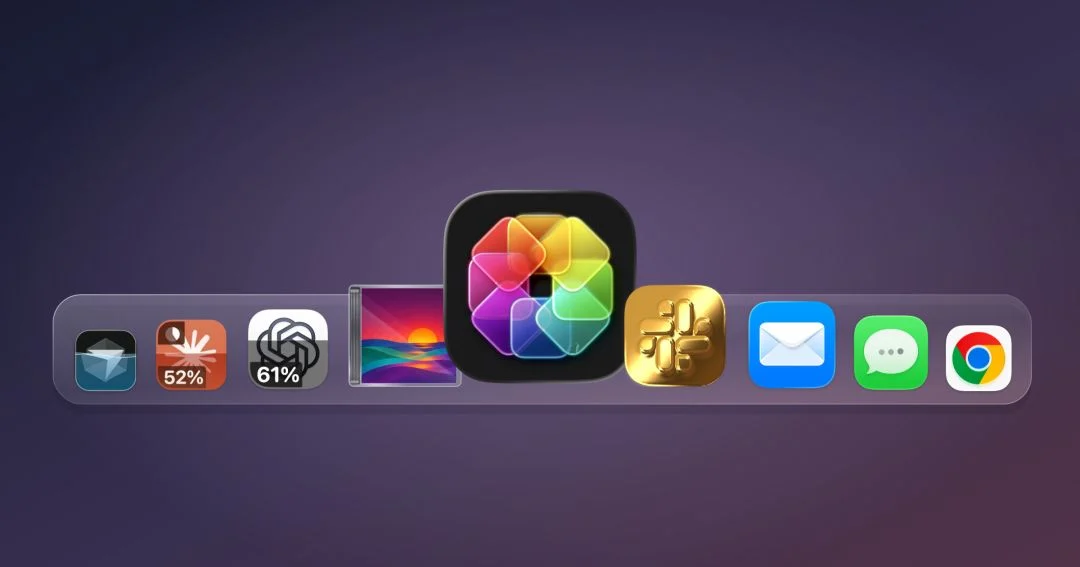
A groundbreaking utility named IconSwapper has recently emerged, offering Mac users an innovative approach to desktop personalization and, notably, a novel method for monitoring Artificial Intelligence (AI) application usage and subscription limits directly from their app icons. This development marks a significant shift in how users can interact with and derive information from their macOS environment, transforming static application emblems into dynamic, data-rich visual indicators.
The Genesis of IconSwapper: A Designer’s Vision for Dynamic Desktops
IconSwapper is the brainchild of Michael Flarup, a Copenhagen-based designer renowned for his extensive work in icon design and his deep understanding of digital aesthetics. Flarup, who operates his own design studio and authored "App Icon Book," a celebrated volume exploring the art and craft of app iconography, has harbored a long-standing passion for desktop customization. His journey into icon design dates back to the early 2000s, a period when Mac users often sought rudimentary ways to personalize their operating systems despite Apple’s traditionally guarded approach to system-level theming. This enduring interest culminated in IconSwapper, a utility designed to inject a greater sense of fun and individuality into the daily software experience, as Flarup himself expressed, believing that "the software we use every day could be a little more fun and a lot more personal."
Flarup’s vision for IconSwapper extended beyond mere aesthetic swaps. He aimed to create a system where icons could not only reflect a user’s style but also communicate real-time information. This ambition led to a complex technical challenge: circumventing macOS’s inherent protections against system icon modification and its lack of official support for dynamic desktop theming. Apple’s operating system is meticulously designed to maintain a consistent user interface and robust security, which historically made deep customization difficult without resorting to unofficial patches or complex workarounds that could compromise system stability.

Navigating macOS Limitations: An Engineering Feat
The development of IconSwapper required an ingenious technical solution to overcome these systemic barriers. Rather than attempting to replace system files or modify core macOS components—a method often fraught with risks and instability—Flarup devised a unique technique that involves drawing directly onto existing app icons. This method allows for the superimposition of custom visual effects, motion, and real-time data displays without altering the underlying application icon files themselves.
Flarup explained to TechCrunch that the core of this innovation lies in its real-time rendering capabilities. His system processes the icon artwork through custom Metal shaders, Apple’s high-performance graphics API, which allows for sophisticated visual effects to be applied dynamically. The critical "breakthrough," as he described it, was "figuring out how to send the Dock a bitmap for another running app and have it draw that frame itself." This technique ensures that the dynamic effects are rendered efficiently and seamlessly integrate with macOS’s native interface elements, including Dock magnification and the Command-Tab application switcher. This meticulous attention to detail ensures that the customized icons behave predictably and fluidly within the macOS environment, maintaining the polished user experience Apple users expect. This method also inherently provides a layer of security, as it doesn’t necessitate deep system modifications that could introduce vulnerabilities.
Real-Time Data at a Glance: The AI Usage Tracking Revolution
The standout feature of IconSwapper, and one that resonates deeply with the contemporary digital landscape, is its ability to transform app icons into live dashboards for AI usage. In an era witnessing an explosion in the adoption of generative AI tools such as ChatGPT, Claude, and Cursor, users frequently encounter usage limits, tiered subscription models, or API call quotas. Monitoring these limits has become an essential aspect of managing both productivity and expenditure. Previously, users would typically need to log into individual AI platforms, consult dedicated dashboards, or rely on third-party browser extensions or standalone widgets to track their consumption.

IconSwapper streamlines this process by integrating live usage statistics directly into the app icon itself. For instance, a user can configure the ChatGPT icon to visually represent their remaining query allowance or display the time until their usage limits reset. This "glanceable" information, presented unobtrusively on the Dock or in the tab bar, eliminates the need to interrupt workflow to check usage statistics. For professionals and enthusiasts heavily reliant on AI for coding, content generation, or research, this feature offers an unparalleled level of convenience and proactive management. Reports from various tech research firms consistently indicate exponential growth in AI tool adoption across industries, underscoring the increasing relevance of such monitoring capabilities. As AI services become more deeply integrated into daily workflows, tools like IconSwapper provide a critical layer of operational awareness.
Beyond AI: A Canvas for Dynamic Personalization
While AI usage tracking has garnered significant attention, IconSwapper’s capabilities extend far beyond this specific application, offering a broad spectrum of dynamic and static customization options for a wide array of Mac applications. The utility supports live icons for many of Apple’s built-in applications, as well as popular third-party software.
For example, Safari’s compass icon can be configured to visually indicate page loads or active downloads, providing a subtle yet informative visual cue of browser activity. The iconic Finder application, represented by the "Finder guy," can be brought to life with eyes that amusingly follow the user’s cursor across the screen, adding a whimsical touch to the desktop. Music app icons can be animated to react to playback, offering a vibrant visual accompaniment to audio. These "fun rather than practical" configurations, as the original report noted, contribute significantly to the personalization aspect Flarup envisioned.
Beyond these dynamic capabilities, IconSwapper also serves as a robust tool for static icon customization. Users can modify various aspects of an app’s appearance, including its design, shading, and overall aesthetic. The application comes equipped with a substantial library of alternative icons, ready for immediate use, catering to diverse stylistic preferences. For those with a more specific vision, IconSwapper allows users to upload their own custom icon designs, providing limitless possibilities for personalization. This flexibility appeals to a broad audience, from those seeking minor aesthetic tweaks to power users desiring a completely bespoke desktop environment.

The Broader Implications for Mac User Experience
The introduction of IconSwapper carries several significant implications for the broader Mac user experience and the future of desktop interface design. Firstly, it enhances user productivity by providing immediate, contextual information without requiring active engagement with an application. The ability to quickly ascertain AI usage or download progress from a glance at the Dock reduces cognitive load and minimizes task switching, contributing to a more efficient workflow.
Secondly, IconSwapper pushes the boundaries of desktop personalization on macOS. For years, Mac users have expressed a desire for deeper customization options, often feeling constrained by Apple’s uniform design language. While Apple prioritizes consistency and ease of use, Flarup’s innovation demonstrates that advanced personalization can be achieved without compromising system integrity or aesthetic coherence. This could potentially influence future design trends, encouraging developers to explore more dynamic and informative iconographies within their applications. Industry analysts suggest that as user expectations for interactive and personalized interfaces grow, tools that empower such customization will become increasingly vital.
Thirdly, IconSwapper subtly challenges the notion of what an application icon can be. Traditionally, icons have served as static launch points or brand identifiers. IconSwapper redefines them as active, data-displaying elements, blurring the lines between an icon and a mini-dashboard. This innovative approach could inspire further exploration into how peripheral UI elements can convey rich, real-time data, potentially leading to a more intuitive and responsive computing experience across various platforms.
Market Position and Accessibility

IconSwapper is available as a one-time purchase, initially offered at a promotional price of $19 before settling at its standard price of $29. This pricing model positions it as an accessible premium utility for Mac users, especially given its unique feature set and the engineering effort involved in its development. In a market often dominated by subscription-based software, a one-time purchase can be particularly appealing to users seeking long-term value without recurring costs. While other tools exist for static icon customization or rudimentary desktop widgets, IconSwapper’s distinctive ability to render live, data-driven animations directly onto app icons sets it apart as a singular offering in the macOS utility landscape. Early reactions from the Mac user community have been overwhelmingly positive, with many praising its intuitive interface and the practical utility of its dynamic features, particularly the AI tracking.
Conclusion
IconSwapper represents more than just another customization tool; it signifies a thoughtful evolution in how users interact with their macOS environment. By transforming static app icons into dynamic, data-rich visual components, Michael Flarup has not only solved a complex technical challenge but has also addressed a growing need for more intuitive data monitoring, particularly in the rapidly expanding realm of AI. This utility empowers Mac users to imbue their desktops with a greater sense of personality and functionality, making their digital workspaces more efficient, informative, and genuinely their own. As the digital world continues to integrate real-time data and AI-driven services, IconSwapper stands as a testament to the power of innovative design and engineering in enhancing the everyday computing experience.
